
G Play 5G 2026
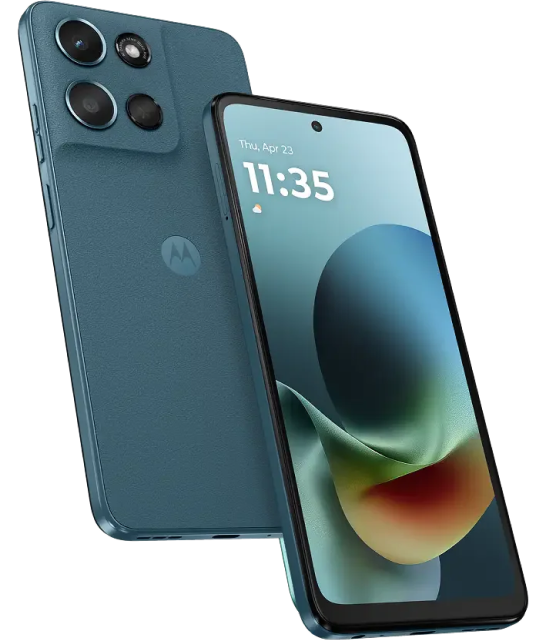
G Play 5G 2026
The Motorola Moto G 5G Play is an affordable 5G smartphone featuring a 6.5″ display for clear visuals, a 50MP camera for detailed photos, and a capable processor for smooth everyday performance. It offers expandable storage, long-lasting battery life, and a compact design, making it ideal for users who want reliable connectivity, essential smartphone features, and value in a budget-friendly package.
- OS: Android 16
- Screen: 6.7” HD+ (1604x720)/263ppi / LCD 120Hz refresh rate / Corning Gorilla Glass 3
- Storage: 64GB/4GBRAM – Expandable up to 1TB with micro SD
- Processor: MediaTek Dimensity 6300 processor with 2.4GHz octa-core CPU and Arm Mali-G57 MC2 GPU
- Camera Rear: 32MP sensor f/2.2 aperture / 0.64um pixel size / Quad Pixel Technology for 1.28um, PDAF, Ambient Light sensor
- Front Camera: 8MP / f/2.0 aperture / 1.12um pixel size
- Network: 5G: 4G: 3G: 2G / NFC: Yes
- Wi-Fi: 802.11 / 2.4GHz & 5GHz, Wi-Fi Hotspot
- Connectivity: 18W device charging capable
- Gestures: Quick Capture / Fast Flashlight / Flip for DND / Pick Up To Silence / Three-Finger Screenshot / Attentive Display / Media Controls / Lift to Unlock / Swipe to Split / Quick Launch
- Security: Fingerprint Reader/ Face Unlock / ThinkShield
- Battery: 5200 mAh
- Hearing Aid Compatibility
- This phone includes a one year manufacturer warranty
FAQs
Yes! Most unlocked phones are compatible with PureTalk’s network. To confirm your phone is compatible, use the Compatibility Checker on our Plans page.
The Compatibility Checker cannot verify if your phone is unlocked. You may be able to check its lock status in your device settings.
iPhone: Go to “Settings” > “General” > “About,” then look for “Carrier Lock.” If you see “No SIM Restrictions,” your iPhone is unlocked.
Android: Menu options vary by device. Go to “Settings” and select “Connections” or “Network & Internet.” Then, select “Mobile Networks” or “More Connection Settings” and look for “Network Lock Status.” If you see “Unlocked,” your device is unlocked.
If you cannot find this information or are still unsure, please contact your current carrier to confirm.
You may be able to check your phone's lock status in your device settings.
iPhone: Go to Settings > General > About, then look for Carrier Lock. If you see “No SIM Restrictions,” your iPhone is unlocked.
Android: Menu options vary by device. Go to Settings and select Connections or Network & Internet. Then, select Mobile Networks or More Connection Settings and look for Network Lock Status. If you see “Unlocked,” your device is unlocked.
If you cannot find this information or are still unsure, please contact your current carrier to confirm.
PureTalk offers device financing to qualifying customers for up to 4 devices and 1 Apple Watch. Device payments would be added to your monthly bill over a 36-month period.
Unlike many other wireless carriers, PureTalk does not lock devices to our network.
Use our Compatibility Checker to confirm your phone is compatible with PureTalk’s network. Your phone must also be unlocked.
The Compatibility Checker cannot confirm your phone’s unlock status. You may be able to check it through your phone’s settings:
For iPhone:
Open Settings.
Select General.
Select About.
Find Carrier Lock. An unlocked iPhone will display No SIM Restrictions.
For Android:
Open Settings.
Select Connections or Network & Internet.
Select Mobile Networks or More Connection Settings.
Find Network Lock Status. An unlocked phone should display Unlocked.
Android menu options vary by manufacturer and model. If you cannot find the unlock status or are unsure, contact your current carrier for confirmation. Phones with remaining device payments may remain locked depending on the carrier’s policy.
The SIM type you need depends on your device model.
If you buy a phone from PureTalk: Your phone includes a physical SIM unless it is eSIM-only. For eSIM-only phones, you will download the eSIM during activation.
If you bring your own phone: eSIM requires a phone compatible with PureTalk eSIM. Check your device on our eSIM page. If your phone is not eSIM compatible, you will need a physical SIM.
If you want to confirm your phone works with PureTalk service, use the Compatibility Checker on our homepage.
When you purchase a device with a new line of PureTalk service, you may qualify for a device discount based on the plan you choose. Discounts can be up to $300 off the device price. If the device price is less than the discount amount, the device is free. Additional terms apply.
Yes. When you purchase a phone with a new line of PureTalk service, you may qualify for a device discount with an eligible plan. The discount amount depends on the plan you choose. Additional terms apply.
To qualify for a phone discount, you must purchase a phone with a new line of service on an eligible plan, port your number to PureTalk, stay enrolled in AutoPay, and remain on an eligible plan for 36 months. Additional terms may apply.