
iPhone Air
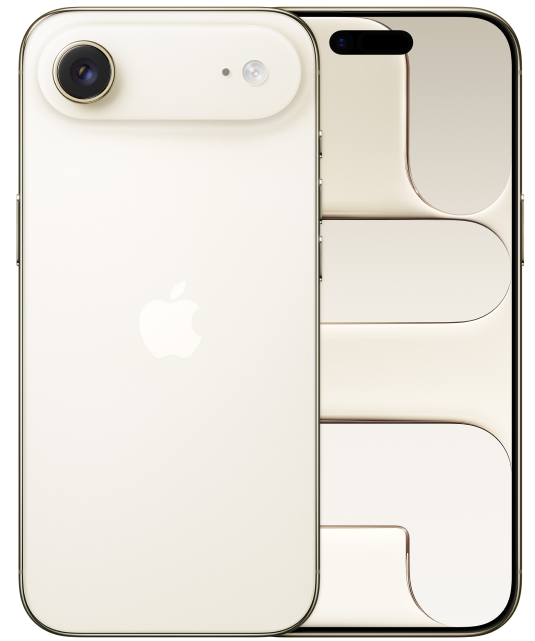
iPhone Air
iPhone Air. The thinnest iPhone ever. 6.5-inch display,1: durable Ceramic Shield front and back, A19 Pro chip, 48MP Fusion camera system, and Center Stage front camera.
- SUPER THIN. STRIKINGLY LIGHT. SHOCKINGLY STRONG: The thinnest iPhone ever, with the power of a pro chip inside. At 5.6 mm, iPhone Air is so impossibly thin and light that it nearly disappears in your hand.
- MORE DURABLE THAN ANY PREVIOUS iPHONE: Ultralight titanium frame. Ceramic Shield protects the back of iPhone Air, making it 4x more resistant to cracks.2: And the new Ceramic Shield 2 on the front has 3x better scratch resistance.3:
- TWO ADVANCED CAMERAS IN ONE: 48MP Fusion camera system with 2x optical-quality zoom. Effortlessly frame the perfect shot from right where you are.
- 18MP CENTER STAGE FRONT CAMERA: Flexible ways to frame your shot. Smarter group selfies, Dual Capture video for simultaneous front and rear recording, and more.
- A19 PRO CHIP. HYPERSPEED. HYPEREFFICIENT: A19 Pro is the most efficient iPhone chip yet. Gives you pro performance in a breakthrough thin and light design.
- ALL-DAY BATTERY LIFE: All-day battery life with up to 27 hours of video playback.4:
- iOS 26. NEW LOOK. EVEN MORE MAGIC: A fresh design with Liquid Glass. Beautiful, delightful, and instantly familiar. With a more vibrant Lock Screen, customizable backgrounds and polls in Messages, Call Screening, and more.5:
- BUILT FOR APPLE INTELLIGENCE: Personal, private, powerful. Write, express yourself, and get things done effortlessly.6:
- SATELLITE FEATURES: If you don’t have cell service or Wi-Fi, iPhone can connect to a satellite so you can send and receive messages and Tapbacks.7: In a severe car crash, iPhone can connect to emergency services when you can’t.8:
- STRONGER CONNECTIVITY. SUPERFAST SPEEDS: Stay connected at faster speeds with secure connections to Wi-Fi 7,9: 5G networks,10: and Bluetooth 6, plus eSIM.11:
- eSIM, FLEXIBLE. SECURE. SEAMLESS: iPhone Air activates with an eSIM.11 With eSIM, you enjoy greater flexibility, enhanced convenience, increased security, and seamless connectivity, especially when traveling internationally.
- PRIVACY: A whole new level of privacy and security. Built in.
-
The display has rounded corners that follow a beautiful curved design, and these corners are within a standard rectangle. When measured as a standard rectangular shape, the screen is 6.27 inches (iPhone 17, iPhone 17 Pro), 6.55 inches (iPhone Air), or 6.86 inches (iPhone 17 Pro Max) diagonally. Actual viewable area is less. ↩
-
Compared with the glass back of previous-generation iPhone. ↩
-
Compared with previous-generation iPhone. ↩
-
All battery claims depend on network configuration and many other factors; actual results will vary. Battery has limited recharge cycles and may eventually need to be replaced. Battery life and charge cycles vary by use and settings. See apple.com/batteries and apple.com/iphone/battery.html for more information. ↩
-
Some features may not be available for all countries or all areas. ↩
-
Apple Intelligence is available in beta. Some features may not be available in all regions or languages. For feature and language availability and system requirements, see support.apple.com/121115. ↩
-
Satellite features are included for free for two years with the activation of any iPhone 14 or later model. Connection and response times vary based on location, site conditions, and other factors. Some satellite features require a carrier plan. SMS messaging via satellite is available on supported carriers. SMS message rates may apply. Satellite connectivity is provided by Globalstar and its affiliates. See support.apple.com/kb/HT213885 for more information. ↩
-
iPhone 17, iPhone 17 Pro, and iPhone Air can detect a severe car crash and call for help. Requires a cellular connection or Wi-Fi calling. ↩
-
Wi‑Fi 7 available in countries and regions where supported. ↩
-
Data plan required. 5G is available in select markets and through select carriers. For details on 5G support, contact your carrier and see apple.com/iphone/cellular. ↩
-
iPhone 14, iPhone 15, iPhone 16, iPhone 17, and iPhone Air models are activated with an eSIM and do not support a physical SIM. Use of an eSIM requires a carrier that supports eSIM and a wireless service plan (which may include restrictions on switching service providers and roaming, even after contract expiration). See your carrier for details. To learn more, visit apple.com/esim. ↩
FAQs
Yes! Most unlocked phones are compatible with PureTalk’s network. To confirm your phone is compatible, use the Compatibility Checker on our Plans page.
The Compatibility Checker cannot verify if your phone is unlocked. You may be able to check its lock status in your device settings.
iPhone: Go to “Settings” > “General” > “About,” then look for “Carrier Lock.” If you see “No SIM Restrictions,” your iPhone is unlocked.
Android: Menu options vary by device. Go to “Settings” and select “Connections” or “Network & Internet.” Then, select “Mobile Networks” or “More Connection Settings” and look for “Network Lock Status.” If you see “Unlocked,” your device is unlocked.
If you cannot find this information or are still unsure, please contact your current carrier to confirm.
You may be able to check your phone's lock status in your device settings.
iPhone: Go to Settings > General > About, then look for Carrier Lock. If you see “No SIM Restrictions,” your iPhone is unlocked.
Android: Menu options vary by device. Go to Settings and select Connections or Network & Internet. Then, select Mobile Networks or More Connection Settings and look for Network Lock Status. If you see “Unlocked,” your device is unlocked.
If you cannot find this information or are still unsure, please contact your current carrier to confirm.
PureTalk offers device financing to qualifying customers for up to 4 devices and 1 Apple Watch. Device payments would be added to your monthly bill over a 36-month period.
Unlike many other wireless carriers, PureTalk does not lock devices to our network.
Use our Compatibility Checker to confirm your phone is compatible with PureTalk’s network. Your phone must also be unlocked.
The Compatibility Checker cannot confirm your phone’s unlock status. You may be able to check it through your phone’s settings:
For iPhone:
Open Settings.
Select General.
Select About.
Find Carrier Lock. An unlocked iPhone will display No SIM Restrictions.
For Android:
Open Settings.
Select Connections or Network & Internet.
Select Mobile Networks or More Connection Settings.
Find Network Lock Status. An unlocked phone should display Unlocked.
Android menu options vary by manufacturer and model. If you cannot find the unlock status or are unsure, contact your current carrier for confirmation. Phones with remaining device payments may remain locked depending on the carrier’s policy.
The SIM type you need depends on your device model.
If you buy a phone from PureTalk: Your phone includes a physical SIM unless it is eSIM-only. For eSIM-only phones, you will download the eSIM during activation.
If you bring your own phone: eSIM requires a phone compatible with PureTalk eSIM. Check your device on our eSIM page. If your phone is not eSIM compatible, you will need a physical SIM.
If you want to confirm your phone works with PureTalk service, use the Compatibility Checker on our homepage.
When you purchase a device with a new line of PureTalk service, you may qualify for a device discount based on the plan you choose. Discounts can be up to $300 off the device price. If the device price is less than the discount amount, the device is free. Additional terms apply.
Yes. When you purchase a phone with a new line of PureTalk service, you may qualify for a device discount with an eligible plan. The discount amount depends on the plan you choose. Additional terms apply.
To qualify for a phone discount, you must purchase a phone with a new line of service on an eligible plan, port your number to PureTalk, stay enrolled in AutoPay, and remain on an eligible plan for 36 months. Additional terms may apply.