
iPhone 16 Pro Max
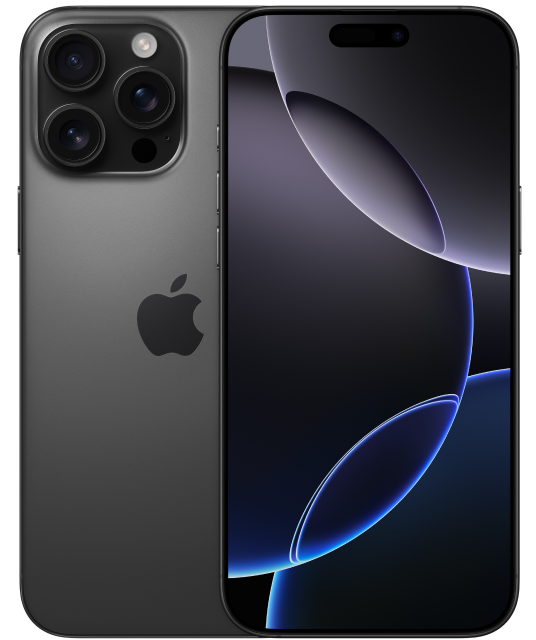
iPhone 16 Pro Max
iPhone 16 Pro Max. Built for Apple Intelligence.1: Featuring a stunning titanium design. Camera Control. 4K 120 fps Dolby Vision. And A18 Pro chip.
- STUNNING TITANIUM DESIGN—iPhone 16 Pro Max has a strong and light titanium design with a larger 6.9-inch Super Retina XDR display.2: It’s remarkably durable with the latest-generation Ceramic Shield material that’s 2x tougher than any smartphone glass.
- BUILT FOR APPLE INTELLIGENCE—Apple Intelligence is the personal intelligence system that helps you write, express yourself, and get things done effortlessly. With groundbreaking privacy protections, it gives you peace of mind that no one else can access your data. Coming fall 2024. 1:
- TAKE TOTAL CAMERA CONTROL—Camera Control gives you an easier way to quickly access camera tools, like zoom or depth of field, so you can take the perfect shot in record time.
- MAGNIFICENT SHOTS—Take your videos to a whole new level with 4K 120 fps Dolby Vision, enabled by the 48MP Fusion camera. The improved 48MP Ultra Wide camera lets you capture mesmerizing detail in macro photos and wide-angle shots.
- PHOTOGRAPHIC STYLES—The latest-generation Photographic Styles give you greater creative flexibility, so you can make every photo even more you. And thanks to advances in the image pipeline, you can now reverse any style, any time.
- THE POWER OF A18 PRO—A18 Pro chip enables Apple Intelligence with a faster Neural Engine, improved CPU and GPU, and a big jump in memory bandwidth. It also drives advanced video and photo features and powers AAA gaming.
- A HUGE LEAP IN BATTERY LIFE—iPhone 16 Pro Max delivers an incredibly power-efficient performance with up to 33 hours video playback.3: Charge via USB-C or snap on a MagSafe charger for faster wireless charging.4:
- CUSTOMIZE YOUR IPHONE—With iOS 18 you can tint your Home Screen icons with any color. Find your favorite shots faster in the redesigned Photos app. And add playful, animated effects to any word, phrase, or emoji in iMessage.5:
- SATELLITE CONNECTIVITY—If you don't have cell service or Wi-Fi, iPhone can connect to a satellite so you can send and receive messages and Tapbacks.6: In a severe car crash, iPhone can connect to emergency services when you can't. 7:
-
Apple Intelligence will be available in beta on all iPhone 16 models, iPhone 15 Pro, and iPhone 15 Pro Max, with Siri and device language set to U.S. English, as an iOS 18 update in fall 2024. Some features and additional languages will be coming over the course of the next year. ↩ ↩
-
The displays have rounded corners. When measured as a rectangle, the screen is 6.12 inches (iPhone 16), 6.69 inches (iPhone 16 Plus), 6.27 inches (iPhone 16 Pro) or 6.86 inches (iPhone Pro Max) diagonally. Actual viewable area is less. ↩
-
Battery life varies by use and configuration. See apple.com/batteries for more information. ↩
-
Accessories sold separately. ↩
-
Some features may not be available for all countries or all areas. ↩
-
Roadside Assistance, Emergency SOS, and Messages via satellite are included for free for two years with the activation of any iPhone 14 or later model. Connection and response times vary based on location, site conditions, and other factors. Messages via satellite requires a carrier plan. SMS messaging via satellite is available on supported carriers. SMS message rates may apply. See https://support.apple.com/kb/HT213885 for more information. ↩
-
iPhone 16 and iPhone 16 Pro can detect a severe car crash and call for help. Requires a cellular connection or Wi-Fi calling. ↩
FAQs
Here are a few ways to check:
- Ask your current carrier if the device is unlocked and no longer tied to a contract or payment plan.
- If you are buying the device, confirm the unlock status before purchasing.
-
Check your device settings:
iPhone: Settings > General > About > Carrier Lock. “No SIM restrictions” usually means the phone is unlocked.
Android: Settings > Connections/Network > Mobile Networks > Network Operators. Turn off “Select automatically” and wait for the list. If multiple networks appear, the phone is likely unlocked.
- Try another SIM: Insert a SIM from a different carrier. If the phone connects, it is unlocked.
If you buy a phone from PureTalk: Your phone includes a physical SIM unless it is eSIM-only. For eSIM-only phones, you will download the eSIM during activation.
If you bring your own phone: eSIM requires a phone compatible with PureTalk eSIM. Check your device on our eSIM page. If your phone is not eSIM compatible, you will need a physical SIM.
If you want to confirm your phone works with PureTalk service, use the Compatibility Checker on our homepage.