
iPhone 14
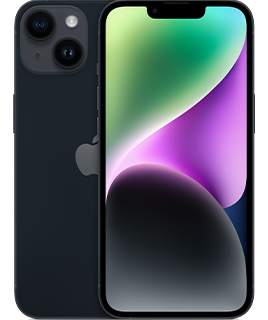
iPhone 14
Experience the iPhone 14, featuring a 6.1-inch Super Retina XDR display, the powerful A16 Bionic chip, and 5G connectivity for lightning-fast performance. Capture stunning photos and videos with the advanced dual-camera system, including 12MP ultra-wide and wide lenses, and enjoy enhanced low-light photography. Designed with durability in mind, it boasts a Ceramic Shield front cover, aerospace-grade aluminum edges, and IP68 water and dust resistance.
The deep midnight color gives your phone a mysterious and elegant look, perfect for those who prefer a touch of sophistication. And the 128GB model offers a generous amount of storage, allowing you to keep a substantial library of photos, videos, and applications at your fingertips.
- 6.1-inch Super Retina XDR display1:
- Advanced camera system for better photos in any light
- Cinematic mode now in 4K Dolby Vision up to 30 fps
- Action mode for smooth, steady, handheld videos
- Vital safety features—Emergency SOS via satellite[2] and Crash Detection
- All-day battery life and up to 20 hours of video playback2:
- A15 Bionic chip with 5-core GPU for lightning-fast performance. Superfast 5G cellular3:
- Industry-leading durability features with Ceramic Shield and water resistance4:
- iOS 16 offers even more ways to personalize, communicate, and share5: 5G-Capable Alt
- A15 Bionic chip with 5-core GPU for lightning-fast performance. 5G capable3: Non-5G Alt
- A15 Bionic chip with 5-core GPU for lightning-fast performance
-
The display has rounded corners. When measured as a standard rectangular shape, the screen is 6.06 inches diagonally. Actual viewable area is less. ↩
-
Battery life varies by use and configuration; see apple.com/batteries for more information. ↩
-
Data plan required. 5G is available in select markets and through select carriers. Speeds vary based on site conditions and carrier. For details on 5G support, contact your carrier and see apple.com/iphone/cellular. ↩ ↩
-
iPhone 14 is splash, water, and dust resistant and was tested under controlled laboratory conditions with a rating of IP68 under IEC standard 60529 (maximum depth of 6 meters up to 30 minutes). Splash, water, and dust resistance are not permanent conditions. Resistance might decrease as a result of normal wear. Do not attempt to charge a wet iPhone; refer to the user guide for cleaning and drying instructions. Liquid damage not covered under warranty. ↩
-
Some features may not be available for all countries or all areas. ↩
FAQs
Yes! Most unlocked phones are compatible with PureTalk’s network. To confirm your phone is compatible, use the Compatibility Checker on our Plans page.
The Compatibility Checker cannot verify if your phone is unlocked. You may be able to check its lock status in your device settings.
iPhone: Go to “Settings” > “General” > “About,” then look for “Carrier Lock.” If you see “No SIM Restrictions,” your iPhone is unlocked.
Android: Menu options vary by device. Go to “Settings” and select “Connections” or “Network & Internet.” Then, select “Mobile Networks” or “More Connection Settings” and look for “Network Lock Status.” If you see “Unlocked,” your device is unlocked.
If you cannot find this information or are still unsure, please contact your current carrier to confirm.
You may be able to check your phone's lock status in your device settings.
iPhone: Go to Settings > General > About, then look for Carrier Lock. If you see “No SIM Restrictions,” your iPhone is unlocked.
Android: Menu options vary by device. Go to Settings and select Connections or Network & Internet. Then, select Mobile Networks or More Connection Settings and look for Network Lock Status. If you see “Unlocked,” your device is unlocked.
If you cannot find this information or are still unsure, please contact your current carrier to confirm.
PureTalk offers device financing to qualifying customers for up to 4 devices and 1 Apple Watch. Device payments would be added to your monthly bill over a 36-month period.
Unlike many other wireless carriers, PureTalk does not lock devices to our network.
Use our Compatibility Checker to confirm your phone is compatible with PureTalk’s network. Your phone must also be unlocked.
The Compatibility Checker cannot confirm your phone’s unlock status. You may be able to check it through your phone’s settings:
For iPhone:
Open Settings.
Select General.
Select About.
Find Carrier Lock. An unlocked iPhone will display No SIM Restrictions.
For Android:
Open Settings.
Select Connections or Network & Internet.
Select Mobile Networks or More Connection Settings.
Find Network Lock Status. An unlocked phone should display Unlocked.
Android menu options vary by manufacturer and model. If you cannot find the unlock status or are unsure, contact your current carrier for confirmation. Phones with remaining device payments may remain locked depending on the carrier’s policy.
The SIM type you need depends on your device model.
If you buy a phone from PureTalk: Your phone includes a physical SIM unless it is eSIM-only. For eSIM-only phones, you will download the eSIM during activation.
If you bring your own phone: eSIM requires a phone compatible with PureTalk eSIM. Check your device on our eSIM page. If your phone is not eSIM compatible, you will need a physical SIM.
If you want to confirm your phone works with PureTalk service, use the Compatibility Checker on our homepage.
When you purchase a device with a new line of PureTalk service, you may qualify for a device discount based on the plan you choose. Discounts can be up to $300 off the device price. If the device price is less than the discount amount, the device is free. Additional terms apply.
Yes. When you purchase a phone with a new line of PureTalk service, you may qualify for a device discount with an eligible plan. The discount amount depends on the plan you choose. Additional terms apply.
To qualify for a phone discount, you must purchase a phone with a new line of service on an eligible plan, port your number to PureTalk, stay enrolled in AutoPay, and remain on an eligible plan for 36 months. Additional terms may apply.