
iPhone 12 Pro
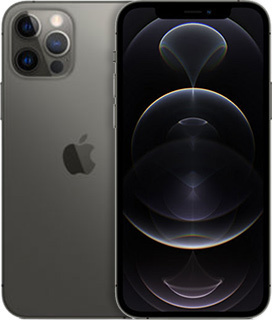
iPhone 12 Pro
iPhone 12 Pro. Beautifully bright 6.1-inch Super Retina XDR display. 1: Ceramic Shield with 4x better drop performance. 2: Incredible low-light photography with a new Pro camera system, and 4x optical zoom range. Cinema-grade Dolby Vision video recording, editing, and playback. Night mode portraits and next-level AR experiences with the LiDAR Scanner. Powerful A14 Bionic chip. 5G capable. 3: And new MagSafe accessories for easy attach and faster wireless charging. 4: For infinitely spectacular possibilities.
- 6.1-inch Super Retina XDR display 1:
- Ceramic Shield, tougher than any smartphone glass
- 5G capable 3:
- A14 Bionic chip, the fastest chip ever in a smartphone
- Pro camera system with 12MP Ultra Wide, Wide, and Telephoto cameras; 4x optical zoom range; Night mode, Deep Fusion, Smart HDR 3, Apple ProRAW, 5: 4K Dolby Vision HDR recording
- LiDAR Scanner for improved AR experiences, Night mode portraits
- 12MP TrueDepth front camera with Night mode, 4K Dolby Vision HDR recording
- Industry-leading IP68 water resistance 6:
- Supports MagSafe accessories for easy attach and faster wireless charging 4:
- iOS 14 with redesigned widgets on the Home screen, all-new App Library, App Clips, and more
-
The display has rounded corners. When measured as a rectangle, the screen is 6.06 inches diagonally. Actual viewable area is less. ↩ ↩
-
Claim based on iPhone 12 Ceramic Shield front compared with previous-generation iPhone. ↩
-
Data plan required. 5G is available in select markets and through select carriers. Speeds vary based on site conditions and carrier. For details on 5G support, contact your carrier and see apple.com/iphone/cellular. ↩ ↩
-
Apple ProRaw coming soon. ↩
-
iPhone 12 is splash, water, and dust resistant and was tested under controlled laboratory conditions with a rating of IP68 under IEC standard 60529 (maximum depth of 6 meters up to 30 minutes). Splash, water, and dust resistance are not permanent conditions. Resistance might decrease as a result of normal wear. Do not attempt to charge a wet iPhone; refer to the user guide for cleaning and drying instructions. Liquid damage not covered under warranty. ↩
FAQs
Here are a few ways to check:
- Ask your current carrier if the device is unlocked and no longer tied to a contract or payment plan.
- If you are buying the device, confirm the unlock status before purchasing.
-
Check your device settings:
iPhone: Settings > General > About > Carrier Lock. “No SIM restrictions” usually means the phone is unlocked.
Android: Settings > Connections/Network > Mobile Networks > Network Operators. Turn off “Select automatically” and wait for the list. If multiple networks appear, the phone is likely unlocked.
- Try another SIM: Insert a SIM from a different carrier. If the phone connects, it is unlocked.
If you buy a phone from PureTalk: Your phone includes a physical SIM unless it is eSIM-only. For eSIM-only phones, you will download the eSIM during activation.
If you bring your own phone: eSIM requires a phone compatible with PureTalk eSIM. Check your device on our eSIM page. If your phone is not eSIM compatible, you will need a physical SIM.
If you want to confirm your phone works with PureTalk service, use the Compatibility Checker on our homepage.