
iPhone 11
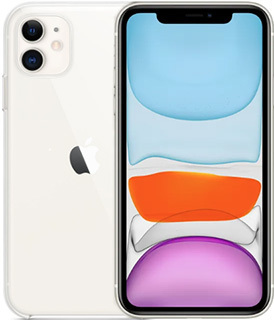
iPhone 11
Shoot 4K videos, beautiful portraits, and sweeping landscapes with the all-new dual-camera system. Capture your best low-light photos with Night mode. See true-to-life color in your photos, videos, and games on the 6.1-inch Liquid Retina display. 1: Experience unprecedented performance with A13 Bionic for gaming, augmented reality (AR), and photography. Do more and charge less with all-day battery life. 2: And worry less with water resistance up to 2 meters for 30 minutes. 1:
- 6.1-inch Liquid Retina HD LCD display3:
- Water and dust resistant (2 meters for up to 30 minutes, IP68) 1:
- Dual-camera system with 12MP Ultra Wide and Wide cameras; Night mode, Portrait mode, and - 4K video up to 60fps
- 12MP TrueDepth front camera with Portrait mode, 4K video, and Slo-Mo
- Face ID for secure authentication and Apple Pay
- A13 Bionic chip with third-generation Neural Engine
- Fast-charge capable
- Wireless charging4: 4
- iOS 13 with Dark Mode, new tools for editing photos and video, and brand new privacy features
Go to apple.com/iphone-11/specs for a complete set.
-
iPhone 11 is splash, water, and dust resistant and was tested under controlled laboratory conditions with a rating of IP68 under IEC standard 60529 (maximum depth of 2 meters up to 30 minutes). Splash, water, and dust resistance are not permanent conditions and resistance might decrease as a result of normal wear. Do not attempt to charge a wet iPhone; refer to the user guide for cleaning and drying instructions. Liquid damage not covered under warranty. ↩ ↩ ↩
-
Battery life varies by use and configuration. See apple.com/batteries for more information. ↩
-
The display has rounded corners. When measured as a rectangle, the iPhone 11 screen is 6.06 inches diagonally. Actual viewable area is less. ↩
-
wireless chargers sold separately. ↩
FAQs
Here are a few ways to check:
- Ask your current carrier if the device is unlocked and no longer tied to a contract or payment plan.
- If you are buying the device, confirm the unlock status before purchasing.
-
Check your device settings:
iPhone: Settings > General > About > Carrier Lock. “No SIM restrictions” usually means the phone is unlocked.
Android: Settings > Connections/Network > Mobile Networks > Network Operators. Turn off “Select automatically” and wait for the list. If multiple networks appear, the phone is likely unlocked.
- Try another SIM: Insert a SIM from a different carrier. If the phone connects, it is unlocked.
If you buy a phone from PureTalk: Your phone includes a physical SIM unless it is eSIM-only. For eSIM-only phones, you will download the eSIM during activation.
If you bring your own phone: eSIM requires a phone compatible with PureTalk eSIM. Check your device on our eSIM page. If your phone is not eSIM compatible, you will need a physical SIM.
If you want to confirm your phone works with PureTalk service, use the Compatibility Checker on our homepage.